Higgsfield Supercomputer Tutorial: How I Created a 15-Second Product Promo

This Higgsfield Supercomputer tutorial shows how I planned, generated, and refined a 15-second product promo for the CraftUXD Oblique MegaPack. The creative concept featured Jessica interacting with a futuristic HUD as different products in the bundle appeared around her.
The real lesson is bigger than one promo. It is how to turn a rough video idea into a structured production plan before spending credits, and how to use story beats, reference assets, camera direction, action timing, sound, and targeted revisions to shape a stronger result.
In my recorded test, the first generation displayed a cost of 135 credits, roughly $7 in my account at that time. That was the cost shown for that generation, not the complete project cost. I later created a second version after identifying specific improvements. Current costs can differ by plan, model, duration, resolution, and pricing.
Watch the complete walkthrough:
Quick answer: To create a product promo in Higgsfield Supercomputer without blindly burning credits, prepare the visual assets first, use Free Mode for text planning, choose Approve before generation, define the story and delivery format, reference attachments with @, inspect Scene Context, correct the production direction, and approve generation only when the plan makes sense.
August 2026 update: Higgsfield currently documents Free Mode as zero-credit text generation inside Supercomputer. Image and video generation still uses credits. AI interfaces and prices change quickly, so confirm the selected mode and displayed cost in your own account.

Why AI video generation can become expensive so quickly
The frustrating cycle is familiar: write a prompt, generate a clip, discover a problem, rewrite the prompt, and pay to generate again. The character changes. A hand touches the wrong control. The camera moves at the wrong time. Interface details disappear. Sound effects do not support the action.
One prompt becomes a trail of disconnected corrections because production began before the creative direction was fully designed.
That is especially risky in a short product promo. Fifteen seconds leaves little room for confusion. Every second must contribute to the idea: introduce the visual world, establish the product, guide attention, reveal value, and end cleanly.
The question is therefore not only, “Which AI video model should I use?” A better question is, “How can I inspect the production logic before I pay for the render?”
What Higgsfield Supercomputer changes
Higgsfield Supercomputer behaves more like an AI production manager than a single video model. You provide the creative brief; it can break the work into steps, select or recommend tools and models, show the proposed production plan and credit cost, wait for approval, and hold the project together for review and revision.
That creates a more intentional video-design workflow:
Traditional video-production task | Plan-first Higgsfield equivalent |
Creative concept | Written brief |
Story beats | Action sequence and timing |
Art direction | Character, HUD, product, and style references |
Shot planning | Scene Context, optics, framing, and camera motion |
Producer review | Planning-stage corrections |
Production approval | Approve before generation |
Video render | Paid generation |
Edit notes | Specific revision direction |
The render is no longer where you first discover what the video was supposed to be.

The story behind the 15-second HUD promo
The promo needed a simple visual story that could be understood without a long explanation. Jessica would act as the guide, the HUD would become the stage, and each product reveal would move the viewer toward the idea of one coordinated MegaPack.
The story can be understood in four beats:
Set the visual world: Jessica appears inside a futuristic interface environment.
Activate the experience: Her interaction brings the central HUD to life.
Reveal the offer: Product categories appear through the hotspot sequence.
Deliver the payoff: The complete MegaPack feels like one connected system rather than unrelated files.
This is still storytelling, even though the finished video is only 15 seconds long. There is a beginning, progression, and payoff. The character is not simply standing beside floating labels; her actions guide the reveal.
The products represented in the HUD include Camtasia, PowerPoint, Storyline, UI elements, Jessica avatar stills and video, and VR office environments, all drawn from the broader Oblique visual family.
See the product behind the promo: The Oblique MegaPack combines seven coordinated asset packs that can extend one visual style across presentations, videos, interactive media, avatars, UI, and immersive environments.

Higgsfield Supercomputer Tutorial: How I Created the Product Promo
Step 1: Prepare the character, HUD, and product references
Reference quality determines how much the system must invent. I gathered Jessica’s character assets and the HUD visual before writing the brief. That gave Higgsfield concrete evidence for the presenter, interface, and overall direction.
For any product video, prepare the assets that define the job:
Character or presenter references
Product images
Brand colors and visual language
UI or environment references
Logos, labels, and details that should remain recognizable
Examples of the desired framing or motion style
Strong inputs do not guarantee a perfect generation, but they reduce ambiguity and give the production plan something specific to protect.
Step 2: Use Free Mode for text planning
In the recording, the default reasoning selection would have consumed credits while I was still thinking through the job. I changed the selector to Free Mode so I could develop the text direction without paying for every planning exchange.
Higgsfield’s current changelog describes Free Mode as free text generation. It does not make the final image or video generation free.
Use this stage to explore the creative idea, answer follow-up questions, compare delivery choices, and refine the brief before the paid production begins.

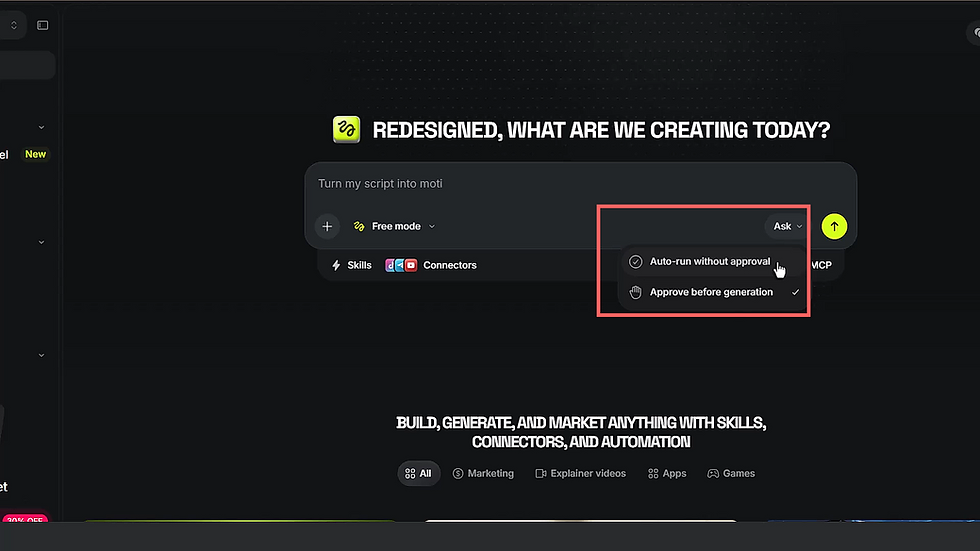
Step 3: Select Approve before generation
Open the Ask menu and choose Approve before generation rather than automatic execution.
This creates the spending checkpoint. Higgsfield can analyze the brief and build its plan, but it must stop before starting the paid render. That is the safer choice for a new workflow, multiple references, controlled branding, or a scene involving precise physical interaction.
Auto-run may make sense after a creative team has tested a repeatable process. It should not replace human review while the direction is still being developed.
Step 4: Write the creative brief and identify assets with @
Describe the purpose, subject, action, output, and constraints. Then use the @ symbol to point Higgsfield toward each relevant attachment.
Here is a cleaned-up version of the brief used for this project:
Use my attached Jessica avatar to demonstrate the digital products included in this bundle. Have her interact with a virtual HUD as each product appears. Create one 15-second hero video in 16:9. Preserve Jessica’s identity and wardrobe, keep the product details accurate, and align her fingertip with the center of each yellow hotspot.
This reads like a compact creative brief rather than a pile of visual adjectives. It identifies the product, presenter, action, references, format, and details that matter.
Step 5: Convert the idea into visible story beats
A short promo still needs progression. Do not ask only for “a woman pointing at a HUD.” Describe what changes over time.
For this project, the direction needed to communicate:
Jessica approaches or engages with the interface.
The central HUD activates.
Product categories are revealed through deliberate hotspot interactions.
Her movement and expression remain controlled rather than repetitive.
The sequence concludes with the MegaPack clearly positioned as the complete offer.
Action timing matters because the viewer must understand each reveal before the next one begins. Fifteen seconds is short, but rushing every product onto the screen at once would weaken the story.
Step 6: Confirm duration, aspect ratio, and delivery
Higgsfield asked how the final media should be delivered. I selected one 15-second hero video in 16:9.
Those settings affect the composition. A widescreen video works well for YouTube, websites, presentations, desktop advertising, product pages, and many embedded-media layouts. A vertical version would require a different arrangement of Jessica, the HUD, labels, and hand movements.
Choose the destination first so the scene is designed for the right frame.
Step 7: Inspect the displayed credit cost
The production plan in my recording showed 135 credits, roughly $7 at the time. That transformed the generation from a casual click into a budget decision.
Before approving, check:
Is the correct character attached?
Are the correct products referenced?
Are duration and aspect ratio right?
Does the action sequence tell a clear story?
Are the framing and camera directions appropriate?
Are identity, wardrobe, product, HUD, and label details protected?
Is anything vague enough to produce an expensive surprise?
The dollar equivalent may change. The review habit should not.

Step 8: Open Scene Context
This is the most important inspection step. Open Scene Context to see the expanded production direction rather than relying only on the short summary.
My plan included:
Optics: field of view and lens behavior
Camera motion: how the view should move through the scene
Action timing: when Jessica turns, points, and makes contact
Physics: how body and object movement should behave
Lighting: how Jessica and the HUD should share one visual world
Audio sync: how sound effects should support the interface actions
Positive locks: identity, wardrobe, product, and other details intended to remain stable
Positive locks can reduce unwanted drift, but they are not a mathematical guarantee. Every generated result still requires review.
The recorded workflow used Seedance 2.0. Models will change, but the need to inspect timing, framing, continuity, physical action, and protected product details will remain.
Step 9: Read and correct the final production description
Do not approve merely because the plan looks detailed. Detail only helps when it matches the intended story.
Read the action order, framing, facial expression, hotspot contact points, label sequence, sound direction, and every element that should remain recognizable. If anything is wrong, reshape the plan while you are still in the text-planning stage.
The system can draft the direction. You remain the creative director who decides whether that direction communicates the product effectively.
Step 10: Generate, review, and revise with specific notes
Once the plan is accurate enough to justify the displayed cost, approve generation.
My first result was promising, but the sound effects needed more work. Jessica needed to fill more of the frame, avoid holding the same smile, and touch the precise center of each yellow hotspot.
Those observations became concrete revision instructions:
Use a tighter mid-shot.
Make the expression more natural instead of maintaining one smile.
Improve the sound effects.
Place the fingertip at the center of each yellow hotspot.
“Make it better” is vague and expensive. A revised shot size, expression, audio direction, and contact point are production notes the system can act upon. Version 1 and Version 2.

My three-try budget rule
In the video, I recommend avoiding more than three paid attempts unless the project intentionally has the budget and time for further exploration. This is my production guardrail, not a universal technical rule.
If several generations repeatedly miss the same objective, stop paying for more outputs and return to the brief, references, story beats, or Scene Context. Another generation cannot repair a requirement that was never communicated clearly.
The goal is not to pretend every clip will succeed once. The goal is to make each attempt deliberate and prevent random iteration from becoming the production process.
Why the Oblique MegaPack matters to this promo
Supercomputer improved the planning and direction, but the promo still needed something worth presenting. Jessica, the HUD treatment, and the product categories all had to point toward a real visual system.
The Oblique MegaPack includes seven coordinated asset groups:
Oblique PowerPoint slides
Oblique Storyline screens
Oblique Camtasia assets
UI navigation elements
Jessica AI-avatar images
Jessica video b-roll
Three 360° office panoramas
The advantage is not merely the number of files. The products share a connected visual language, allowing the promo to present the pack as one family rather than a random collection of unrelated downloads.
That same coordination helps designers carry a visual idea across presentations, videos, demonstrations, interactive experiences, onboarding, product marketing, and immersive environments.
Explore the Oblique MegaPack and preview each part of the coordinated product family.

Where this plan-first video workflow can be used
The method is not limited to CraftUXD or one industry. It can support any short-form video project that needs clear creative direction before generation:
Product launches and feature reveals
Website hero videos
Social advertisements
Brand explainers
Software or interface demonstrations
Event and campaign teasers
Course and training promotions
Character-led storytelling
Internal communications
Concept prototypes for a larger production
The format may change, but the logic remains the same: establish the idea, prepare the references, map the progression, inspect the direction, control approval, and revise with specificity.
For related CraftUXD thinking, explore AI Multimedia in Learning Design, Modern eLearning UI/UX, and Camtasia for Corporate Motion Design.
Frequently asked questions
What is Higgsfield Supercomputer?
Higgsfield Supercomputer is a creative workspace that can interpret a brief, plan production steps, select tools or models, and generate media. Its value in this workflow is the planning layer between the initial idea and the paid render: the creative direction and displayed cost can be reviewed before generation begins.
How do you create a product promo in Higgsfield Supercomputer?
Prepare character, product, brand, and style references; write a concise creative brief; define the story progression, duration, and aspect ratio; select approval before generation; inspect Scene Context; and correct the direction before approving. After generation, revise with specific shot, action, expression, product, and sound notes.
Does Higgsfield Free Mode make video generation free?
No. Higgsfield currently describes Free Mode as zero-credit text generation inside Supercomputer. Image and video generation still consumes credits. Use Free Mode to develop and refine the production plan, then verify the displayed generation cost before approving.
How can a 15-second product video tell a story?
Use a compact sequence: establish the visual world, introduce the character or product, create one clear action, reveal the offer in stages, and finish with a recognizable payoff. Storytelling does not require a long runtime; it requires understandable progression.
How can I keep an AI avatar and product more consistent?
Use clean, high-quality references instead of relying only on a text description. Identify the attachments directly, describe the details that should remain stable, and review each generation. Positive locks can help reduce drift, but no generative workflow should be treated as perfectly deterministic.
Is the Oblique MegaPack a Higgsfield product?
No. The Oblique MegaPack is a CraftUXD product. Higgsfield Supercomputer was the AI production environment used to create the HUD promo. The MegaPack contains the coordinated PowerPoint, Storyline, Camtasia, UI, avatar, video, and VR products demonstrated in the promotion.
Final takeaway: direct first, generate second
The most expensive AI video mistake is approving production logic you have not fully reviewed.
Start with reliable references. Define the story. Use planning to remove ambiguity. Keep approval under human control. Open Scene Context. Inspect character identity, product details, action, timing, camera, lighting, and sound. Then generate when the direction is accurate enough to justify the displayed cost.
That is how Higgsfield Supercomputer becomes more useful for video design: not as a slot machine for prompts, but as a structured creative-production workflow.
Watch the complete Higgsfield walkthrough, then explore the product behind Jessica’s HUD promo in the CraftUXD Oblique MegaPack.


Comments